
 FOR DEVELOPERS
BUILD WITH THE API
Trading & copying APIs
Give your customers live account data, trade controls and copying inside your app
Connect a demo account and make your first API call
MIRRO API · FOR BUILDERS
Connect MetaTrader 4, MetaTrader 5, cTrader and TradeLocker to your app
Bring live account data, trading and copying into your own product
 MT4MT5
 cTrader
 TradeLocker
Want to copy trades without writing code? Explore MIRRO HQ →
CHOOSE WHAT YOU WANT TO BUILD
Trading infrastructure, prop-firm software and AI — with a clear starting point for each
FOR DEVELOPERSBUILD WITH THE API
Give your customers live account data, trade controls and copying inside your app
Connect a demo account and make your first API call
 FOR PROP-FIRM FOUNDERS
START OR GROW A PROP FIRM
Run challenge evaluations and account delivery from your existing software, or launch with a branded website, trader dashboard and back office
Explore business solutionsMIRA AI · FOR BUILDERS & BUSINESSES
Use Mira to build and improve websites and apps, or help customers with answers and actions connected to your business
BUILT AROUND YOUR BUSINESS
Keep your customer experience
Add the trading infrastructure behind it
Build dashboards and journals with balances, equity, open positions and deal history from connected accounts
Build your integration →Let customers connect their accounts and receive copied trades, with sizing and instrument matching for each connection
Explore the Copy API →Add account connections, trading and copying to your own branded application while your team owns the customer experience
Discuss your platform →Monitor challenges, apply program rules and manage account delivery through the engine or a branded workspace
Explore firm tools →SEE THE REAL WORKFLOW
Place a demo trade, connect a subscriber and follow a copied position from open to close
Send a small order, inspect the fill and verify the close
View steps and transcriptLink two accounts and follow a copied trade through its close
View steps and transcriptActual recorded workflows · full recorded screen · demo funds for trading · idle waits shortened
Inside MIRRO API
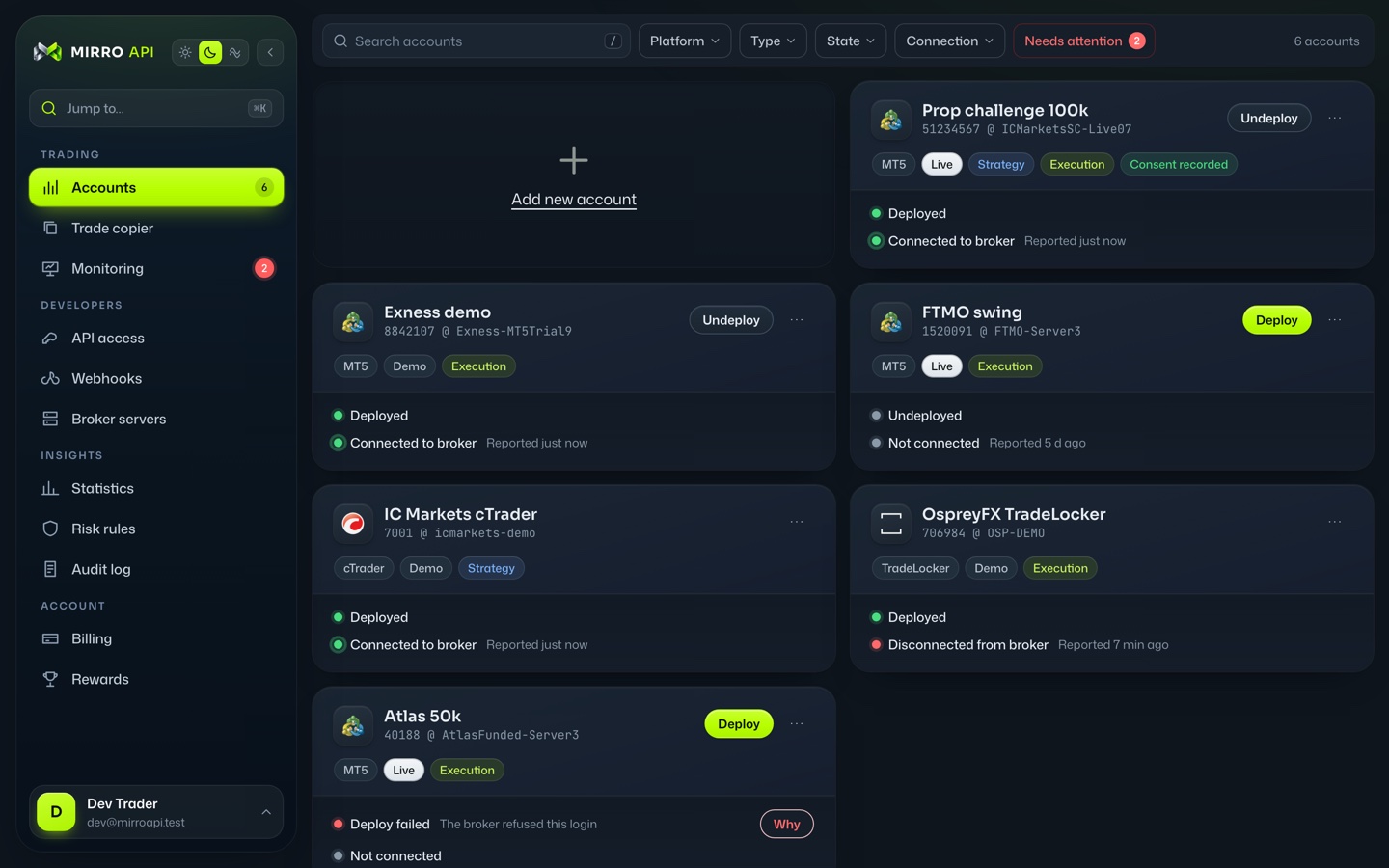
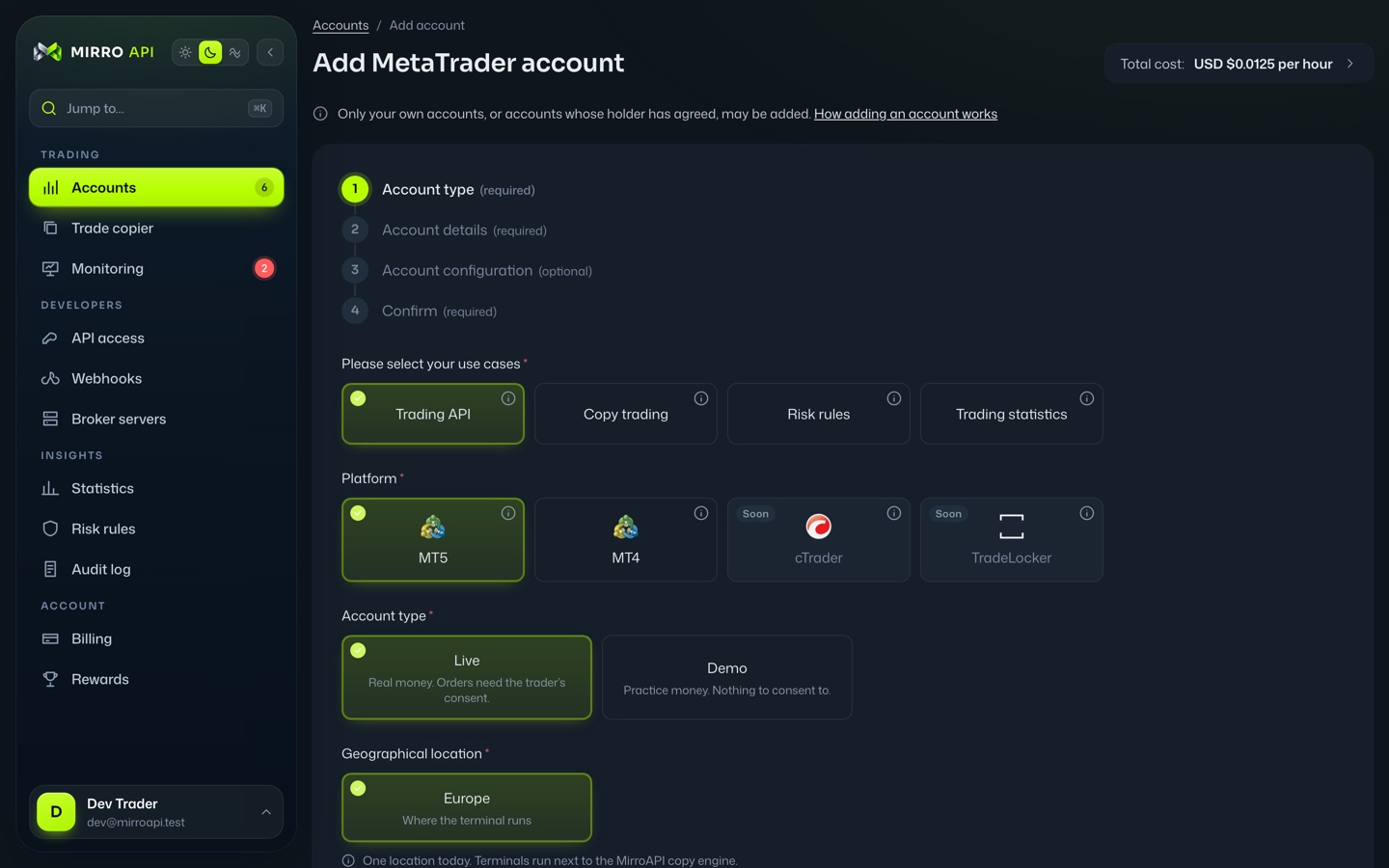
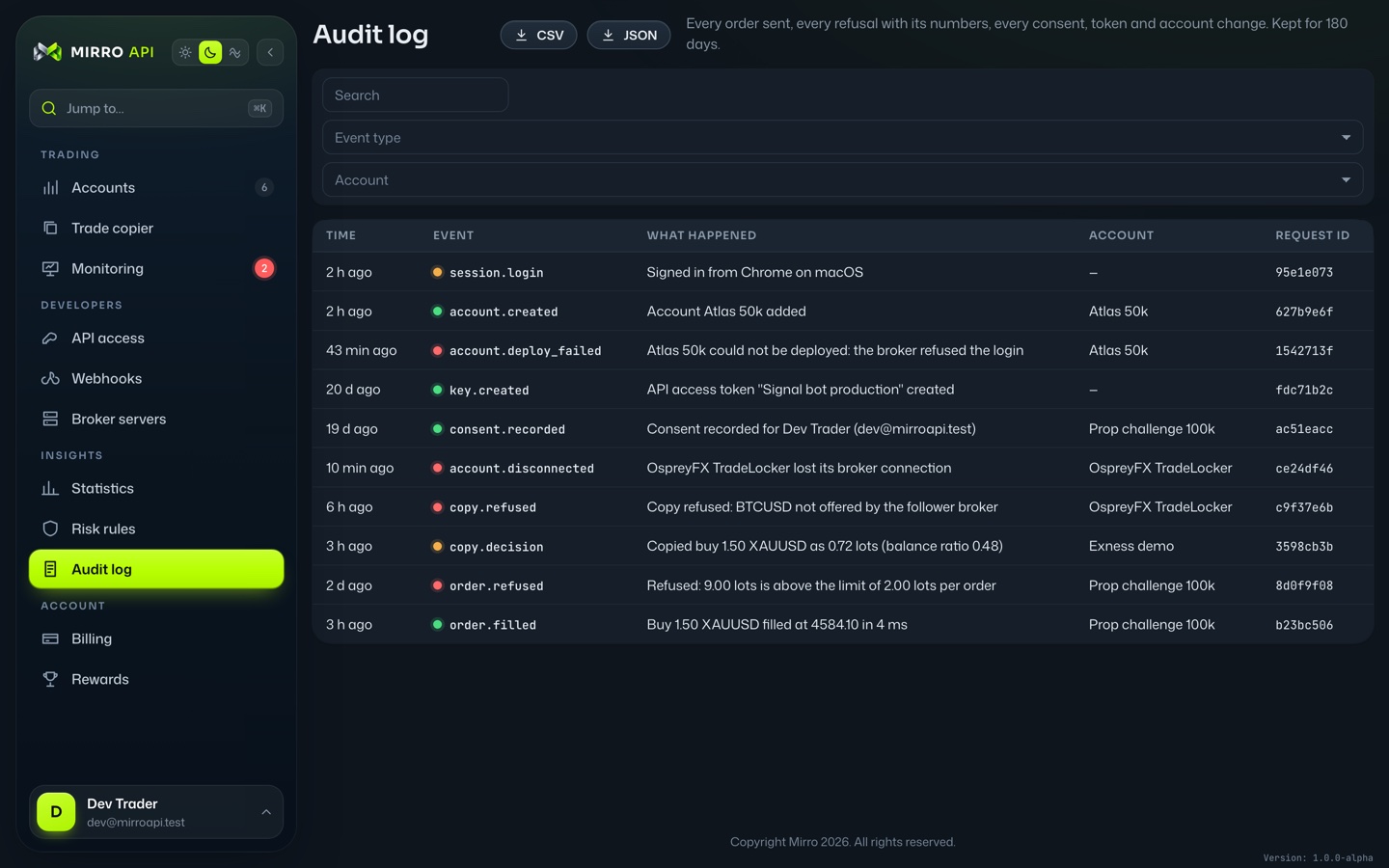
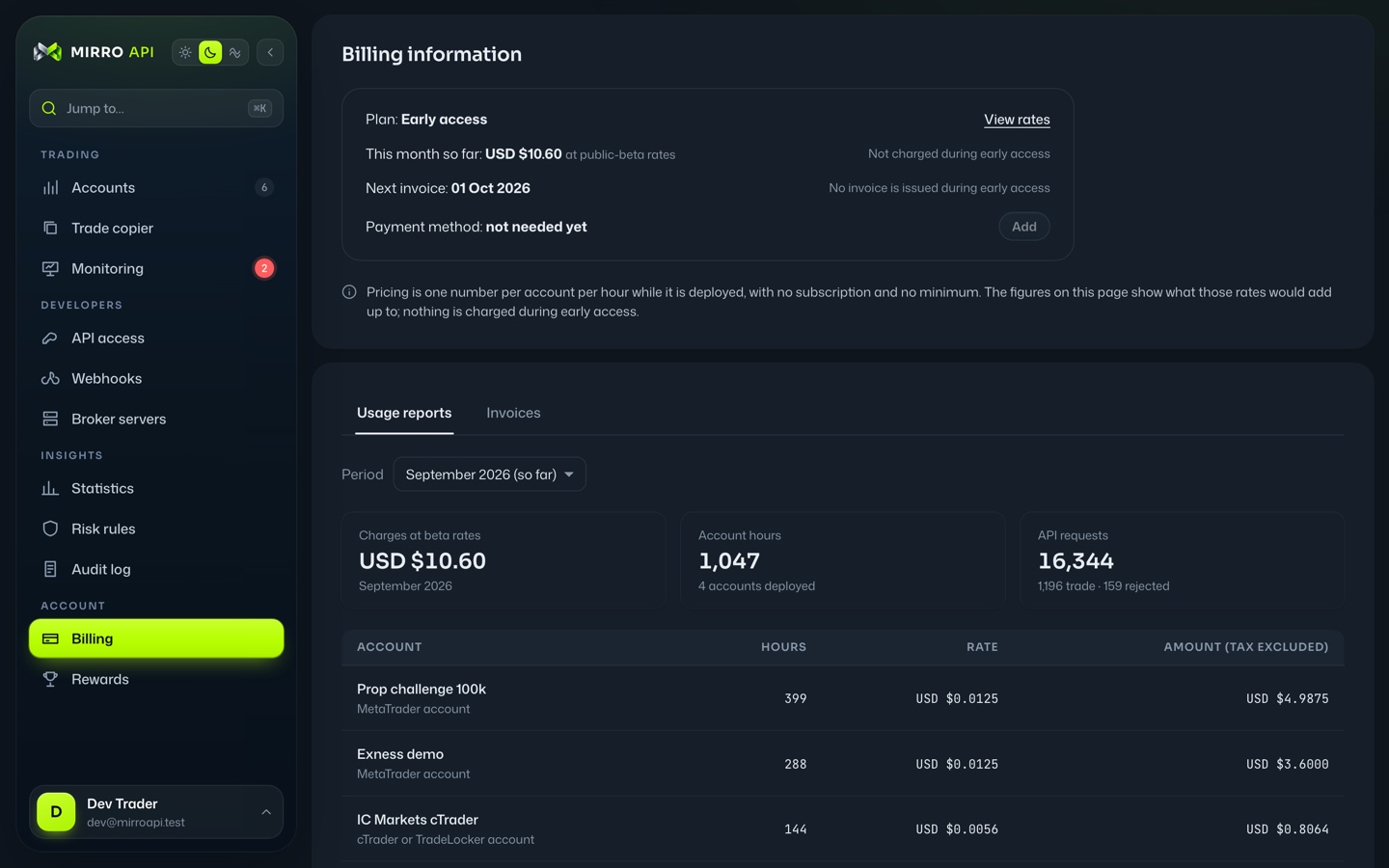
Check account health, investigate trade outcomes and manage costs in one console
Product previews use example accounts
Explore account data, execution, copying and controls
Each capability links to its API reference
Illustrative requests and responses · sample account data
/accounts/{accountId}/informationJavaScriptconst r = await fetch( `${API}/accounts/acc_7d2f/information`, { headers: { Authorization: `Bearer ${key}` } });const info = await r.json();
{ "broker": "IC Markets", "server": "ICMarketsSC-Live07", "currency": "USD", "balance": "100412.20", "equity": "100538.64", "margin": "1240.00", "freeMargin": "99298.64", "leverage": 100}
A consistent account shape
Check platform capabilities and data freshness before acting on it
/accounts/{accountId}/history/dealsJavaScriptconst r = await fetch(`${API}/accounts/acc_7d2f` + `/history/deals?from=2026-09-01&cursor=${cursor}`, { headers: { Authorization: `Bearer ${key}` } });
{ "items": [ { "ticket": "8842107", "symbol": "XAUUSD", "type": "buy", "price": "4571.30", "profit": "84.10" } ], "nextCursor": "eyJ0aWNrZXQiOjg4NDIxMDd9"}
Read observed deals by cursor
Available history depends on what the connected terminal reports
/accounts/{accountId}/tradesJavaScriptawait fetch(`${API}/accounts/acc_7d2f/trades`, { method: "POST", headers: { ...auth, "Idempotency-Key": "ord_7f3a91c2" }, body: JSON.stringify({ action: "market", symbol: "XAUUSD", side: "buy", volume: "1.50", stopLoss: "4560.00" }) });
{ "id": "cmd_lx3k9a2fq8b1", "accountId": "acc_7d2f", "state": "queued", "result": null}
202 means accepted, not filled
Read the command outcome or subscribe to updates for the broker result
Reuse the same idempotency key when retrying a request
/accounts/{accountId}/symbols/{symbol}/priceJavaScriptconst r = await fetch(`${API}/accounts/acc_7d2f` + `/symbols/XAUUSD/price`, { headers: { Authorization: `Bearer ${key}` } });// the contract specification sits next to it
{ "symbol": "XAUUSD", "bid": "4584.02", "ask": "4584.24", "time": "2026-09-17T14:02:11.418Z", "ageSeconds": 0.4, "stale": false}
A quote read from the account's own terminal, with its age and whether it is stale, and the contract specification beside it
Candle, tick-history and depth reads are not available on this connection
/copiesJavaScriptawait post(`${API}/copies`, { masterAccountId: "acc_7d2f", followerAccountId: "acc_c19e", sizing: { mode: "proportional", ratio: "0.48" }, copyStopLoss: true });
{ "id": "cp_91ab", "masterAccountId": "acc_7d2f", "followerAccountId": "acc_c19e", "sizing": { "mode": "proportional", "ratio": "0.48" }, "status": "mirroring", "active": true}
Status names the exact precondition a link is missing, never a bare "active"
Positions come from full snapshots, never diffs
/audit/eventsJavaScriptconst r = await fetch(`${API}/audit/events` + `?type=order.refused&limit=1`, { headers: { Authorization: `Bearer ${key}` } });
{ "items": [ { "type": "order.refused", "requestId": "b08301bf", "summary": "9.00 lots is above the limit of 2.00 lots per order", "evidence": { "requestedLots": "9.00", "maxLots": "2.00" } } ]}
Every event carries the snapshot and arithmetic behind it
Review the recorded details before contacting support
/accountsJavaScriptconst acc = await post(`${API}/accounts`, { platform: "mt5", name: "Atlas 50k", login: "40188", server: "AtlasFunded-Server3", password: env.MT5_PW });await post(`${API}/accounts/${acc.id}/deploy`); // bills
{ "id": "acc_9b31", "platform": "mt5", "name": "Atlas 50k", "broker": "Atlas Funded", "server": "AtlasFunded-Server3", "state": "DEPLOYED", "connection": "CONNECTED", "consent": "none"}
MetaTrader 4 and 5 account plans include hosting; uncovered deployed hours are metered
cTrader and TradeLocker have separate signed-in connection flows; GET /platforms names them in selfOnboard.via
Secrets go into a vault and are never returned
/accounts/{accountId}/consentJavaScriptawait post(`${API}/accounts/acc_7d2f/consent`, { traderName: "Dev Trader", traderEmail: "dev@mirroapi.test", statement: "I authorise trading on account 51234567." });
{ "accountId": "acc_7d2f", "traderName": "Dev Trader", "traderEmail": "dev@mirroapi.test", "statement": "I authorise trading on account 51234567.", "recordedAt": "2026-08-28T14:02:11Z"}
Trade scope on a live account is refused until this record exists
It is also the audit artefact prop firms ask for
/platformsJavaScriptconst r = await fetch(`${API}/platforms`, { headers: { Authorization: `Bearer ${key}` } });
[ { "id": "mt5", "authorisation": "terminal" }, { "id": "mt4", "authorisation": "terminal" }, { "id": "ctrader", "authorisation": "oauth" }, { "id": "tradelocker", "authorisation": "credentials" }]
Cloud MetaTrader 4 and 5 terminals with a reachable broker server and valid account credentials
cTrader and TradeLocker need no hosted terminal
Their signed-in connection flows verify access; live accounts need broker access checks and the account holder’s approval
No standby terminal is in service: every account runs on standard reliability
/streamJavaScriptconst ws = new WebSocket(`${WS}/stream`);ws.send(JSON.stringify({ op: "auth", token: key }));ws.send(JSON.stringify({ op: "subscribe", accountId: "acc_7d2f", channels: ["positions", "orders", "commands"] }));
{ "op": "snapshot", "seq": 1041, "accountId": "acc_7d2f", "ch": "positions", "terminalFresh": true, "data": [{ "ticket": "8842131", "symbol": "XAUUSD", "volume": "1.50" }]}
One plain WebSocket from any language: the account, its positions, orders and commands as full snapshots with sequence numbers and a five-minute resume buffer
Replay is bounded and process-local, with explicit resets
Signed, retried webhooks for server-to-server delivery
/accounts/{accountId}/riskJavaScriptawait put(`${API}/accounts/acc_7d2f/risk`, { maxLotsPerOrder: "2.00", maxDailyLossPercent: "4", maxOpenLots: "6.00", tradingHours: "Mon-Fri 07:00-21:00 Europe/London" });// a 9.00-lot order on this account now returns:
{ "error": { "code": "RISK_MAX_LOTS", "message": "9.00 lots is above the limit of 2.00 lots per order", "details": { "arithmetic": { "requestedLots": "9.00", "maxLots": "2.00" } } }}
Refuse-to-send is the only mode: a command that would breach is refused with the numbers, never sent and flattened afterwards
A rule the gateway cannot enforce is refused, not stored
Read balances, equity, margin, positions and pending orders from connected MT4 and MT5 accounts
See how fresh the data is before your app acts on it
Build reports from the deals your connected terminal has reported
Filter by date and load results a page at a time
Send market and supported pending orders, update stops and close positions
Track the broker result separately from the accepted request
Read your MT4 or MT5 account’s bid and ask prices, quote age and instrument specifications
Check the platform capabilities for available market data
Connect a source account to receiving accounts across supported brokers and platforms
Set trade sizing and instrument matching, and follow each copy outcome
Trace a submitted command, broker result or refusal with the figures behind it
Give your team the information to investigate an issue
Add, start and stop account connections from your application
MIRRO runs MT4 and MT5 terminals in the cloud; cTrader and TradeLocker use their own connection flows
Need new demo accounts? Explore supported broker creation
Account provisioning API docsRecord the account holder’s approval before trading on a live account
Keep consent alongside the account’s access history
See which connections and trade actions each platform supports before integrating
Broker access checks apply; live copying requires the account holder’s approval
Receive account snapshots over WebSocket and signed event webhooks on your server
Resume within the available replay window or refresh from a new snapshot
Set supported limits for order size, total open volume and trading hours
Requests that breach an enforced rule are refused before sending
Choose a fixed account plan or pay by connected hour
Trading and Copy API access are included — no separate per-request charge
Free workspace signup · choose how to pay for connected accounts below. Demo hosting is billed too. Create your workspace →
One region (Europe, next to the copy engine) and one reliability tier: standard, one MetaTrader terminal (MT4 or MT5) per account with no hot standby
Standby terminals are not available; requests for high reliability return RELIABILITY_UNAVAILABLE
One measured MT5 demo run On the production engine (15 Sep 2026): a command is on the terminal's socket 1–2 ms after the gateway accepts it; the broker's fill came back 300–450 ms later (Exness demo); the copy landed on the follower 0.45 s after the master's fill, broker included
Every Command carries its own latencyMs, so you can inspect your own results
Those figures are MetaTrader 5, whose terminal holds a socket to the engine
MetaTrader 4 terminals fetch commands over HTTP long-poll or the file carrier, so their figure is measured separately; it is published once measured on the production engine, not before
Account plan
USD $6 per account per 30 days, trading APIs included
The hourly rates below do not apply to an account covered by a paid plan
Connected (active) trading accounts
USD $0.0056 per account per hour
Account connection
USD $0 per trading account
API-platform accounts have one reliability tier: there is no terminal to replicate
Disconnected (inactive) trading accounts
USD $0 per account per hour
Included
Included
Included
Included
Included
Account plan
USD $6 per account per 30 days, trading APIs included
The hourly rates below do not apply to an account covered by a paid plan
Deployed (active) trading accounts hosting
USD $0.0125 per account per hour
Account deployment
USD $0 per trading account
Billed hourly from DEPLOYED, rounded up
No multi-hour minimum
Undeployed (inactive) trading accounts hosting
USD $0 per account per hour
Adding a trading account to MirroAPI cloud
USD $0 per unique account
Included
Included
Included
Included
Included
YOUR FIRST CONNECTION
Start with a demo account and see the data your product will use
Sign up, open API access and create a test key
Choose your platform, add account access and select a plan or fund connected-hour usage
Read balances and positions, try a supported trade and check its result in the console
No trading VPS or local terminal is needed for MIRRO’s cloud MT4 and MT5 connections
cTrader and TradeLocker use their own connection flows
Your application still needs its own hosting
Yes — use the APIs behind your existing website, dashboard or trading service
For a branded prop-firm website and workspace, explore our prop-firm solutions
Check the platform capabilities and try your broker connection on a demo account
Support depends on the platform, broker access and account permissions
The $6 plan covers one connected account for 30 days, including trading and Copy API access
Mira AI, prop-firm packages and implementation services are priced separately
For a larger deployment, tell us about your requirements